Frame interpolation
Multiply frames between keyframes with RIFE 4.22-lite, RIFE 4.25-heavy and GMFSS for fluid in-betweens. Scene-change detection built in.
RIFE · GMFSS · Scene cut
v2.8.0 Open source AGPL-3.0
An open-source AI video toolkit built for anime. Interpolation, upscaling, depth, segmentation and restoration in one pipeline. Runs on CUDA, TensorRT, DirectML, OpenVINO and Apple Silicon MPS.


--upscale_method adore. Drag the handle.
Capabilities
Multiply frames between keyframes with RIFE 4.22-lite, RIFE 4.25-heavy and GMFSS for fluid in-betweens. Scene-change detection built in.
RIFE · GMFSS · Scene cut
2× resolution with anime-tuned models. ShuffleCugan, SPAN, Adore, Fallin Strong and the ArtCNN family all supported.
ShuffleCugan · SPAN · Adore · ArtCNN
Monocular depth estimation via Depth Anything V2 and V3, plus Distill and temporally-stable Video variants, for After Effects 2.5D parallax and shader work.
DA V2 / V3 · Distill · Video
Alpha-channel mattes for character isolation. Clean edges on hair, armor and line art — ready for compositing in Resolve or AE.
ISNet · Alpha out
SCUNet denoising, anime-specific sharpening and deblock. Rescue old broadcast masters without destroying cel detail.
SCUNet · NAFNet · DeHalo · Anime1080Fixer
Drops redundant or near-identical cels before the GPU touches them — fewer frames in means faster passes out. Swap detection with --dedup_method.
SSIM · MSE · FlowNetS · VMAF
Drop TAS directly into your motion-graphics workflow, or script every pass from the terminal. Same models, same flags, same results.
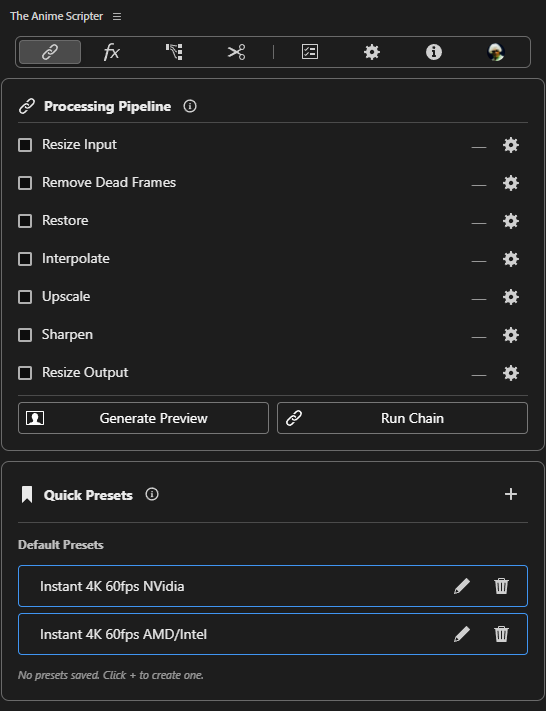
The TAS GUI, docked inside your Adobe workflow. Queue shots, pick a preset, render — without leaving your comp. Full After Effects support, Premiere Pro in alpha.
In TAS-AdobeEdition the CUDA, TensorRT and OpenVINO backends are paid (MPS coming). The CLI stays free.
After Effects · Premiere Pro alpha · Windows · macOS
Every pass is a flag on main.py. Script it, batch it, drop it in a Makefile — it's just a CLI.
Free and open source. Every model, every backend.
main.py · Python 3.14 · AGPL-3.0
Pipeline
Every pass TAS runs shares a single in-memory frame queue — no redundant disk writes between stages. Flags you pass on the command line decide which nodes light up.
Local file, batch list or YouTube URL.
mp4 · mkv · mov · webm
Drops redundant cels before the GPU ever sees them.
SSIM · MSE · FlowNetS · VMAF
Synthesizes in-between frames from neighboring keyframes.
RIFE 4.6 → 4.25-heavy · GMFSS · Elexor
2× with anime-tuned super-resolution architectures.
ShuffleCugan · SPAN · Adore · OpenProteus · AniScale2
Denoise, deblock, dejpeg, sharpen and darken line art — chainable.
SCUNet · NAFNet · Anime1080Fixer · FastLineDarken
FFmpeg hand-off with animation-tuned x264/x265 or NVENC.
x264_animation_10bit · x265 · NVENC · AV1 · ProRes
Models
80 models across five families, before backend variants. Bring your own with --custom_model — Spandrel formats (.pt, .pth, .ckpt, .safetensors) on CUDA, .onnx on TensorRT, DirectML and OpenVINO.
RIFE · GMFSS · DistillDRBA
SPAN · ShuffleCugan · ArtCNN
Denoise · Deblock · Line art
Depth Anything V2 / V3 · Distill · Video
ISNet · Alpha matte output
CLI
Every pass is a flag. Chain them. Auto-enable is real — specifying a *_method turns the feature on for you.
$ python main.py --input anime_episode.mkv \
    --upscale_method shufflecugan-tensorrt \
    --interpolate_method rife4.25-tensorrt --ensemble \
    --restore_method anime1080fixer-tensorrt \
    --dedup_method ssim-cuda \
    --sharpen --sharpen_sens 30 \
    --encode_method x264_animation_10bit --bit_depth 10bit
› resolving backends · tensorrt engines cached
› stage: dedup        · ssim-cuda
› stage: interpolate  · rife4.25-tensorrt (ensemble)
› stage: upscale      · shufflecugan-tensorrt (2×)
› stage: restore      · anime1080fixer-tensorrt + sharpen
› encoder · libx264 · animation · 10-bit
Install
Prebuilt releases for Windows x64 and Apple Silicon macOS. No Python install required on either. Linux runs from source.
> irm tas.nevermindnilas.dev/install.ps1 | iexFAQ
If you have an RTX 20/30/40/50 card, use the CUDA + TensorRT build for the best speed. GTX 16 series works on CUDA. GTX 10 series (Pascal) and AMD cards run on the DirectML backend. Intel iGPUs and dGPUs run on OpenVINO. Apple Silicon runs on MPS. Pick the matching -tensorrt, -directml, -openvino or -mps model suffix.
macOS: yes, on Apple Silicon. Every release ships a prebuilt macOS-arm64 zip alongside the Windows one, and MPS accelerates interpolation, upscaling, restoration, depth and motion blur. Be aware of the gaps: segmentation, dedup, scene detection and stabilization have no MPS path and fall back to CPU, there is no TensorRT / DirectML / OpenVINO, there is no hardware video encoder, and Intel Macs are not supported. You also need Homebrew — TAS installs FFmpeg through it on first run rather than bundling it.
Linux: runs from source with the CUDA or lite dependency profile, but there is no prebuilt binary yet.
Yes. The --custom_model flag accepts .pt, .pth, .ckpt and .safetensors for the CUDA compact path via Spandrel, and .onnx for the -directml, -openvino and -tensorrt variants. Just match the backend suffix to the file format.
Not for the prebuilt Windows or macOS release — everything you need is bundled. On first run TAS will fetch FFmpeg automatically if it isn't already present. You only need Python if you're cloning the repo to develop, in which case pip install -r requirements.txt plus one of the extra-requirements-* profiles will get you going.
The CLI is unpaid work. TAS-AdobeEdition's GPU backends are paid, and GitHub Sponsors and Patreon cover model training and hardware. Sponsors get a role on the Discord — run /verify_sponsor and follow the link it gives you.
Yes — new models, backends and restoration passes land regularly. The standalone Windows app and TAS-AdobeEdition (After Effects, with Premiere Pro support in alpha) are both under active development. Follow releases on GitHub or join the Discord for nightly builds.
Free CLI. Every model, every backend.
TAS is unpaid work. If it saves you render hours —
GitHub Sponsors or
Patreon.
Either one gets you the sponsor role on Discord via /verify_sponsor.
Windows · macOS · TAS-AdobeEdition is sold separately.