Frame interpolation
Multiply frames between keyframes with RIFE 4.22-lite, RIFE 4.25-heavy and GMFSS for fluid in-betweens. Scene-change detection built in.
RIFE · GMFSS · Scene cut
An open-source AI video toolkit built for anime. Interpolation, upscaling, depth, segmentation and restoration in one pipeline, as a desktop app, an After Effects panel or a command line.


--upscale_method adore. Drag the handle.
Capabilities
Multiply frames between keyframes with RIFE 4.22-lite, RIFE 4.25-heavy and GMFSS for fluid in-betweens. Scene-change detection built in.
RIFE · GMFSS · Scene cut
2× resolution with anime-tuned models. ShuffleCugan, SPAN, Adore, Fallin Strong and the ArtCNN family all supported.
ShuffleCugan · SPAN · Adore · Cyte · ArtCNN
Monocular depth estimation via Depth Anything V2 and V3, temporally-stable Video variants and the anime-tuned Limbo models, for After Effects 2.5D parallax and shader work.
DA V2 / V3 · Video · Limbo
Alpha-channel mattes for character isolation. Clean edges on hair, armor and line art, ready for compositing in Resolve or AE.
ISNet · BiRefNet · Alpha out
SCUNet denoising, anime-specific sharpening and deblock. Rescue old broadcast masters without destroying cel detail.
SCUNet · NAFNet · DeHalo · Anime1080Fixer
Drops redundant or near-identical cels before the GPU touches them. Fewer frames in means faster passes out. Swap detection with --dedup_method.
SSIM · MSE · FlowNetS · VMAF
Apps
Click through it on the desktop, render from inside After Effects, or script every pass from a terminal. Same models, same flags, same results.
New Windows 10 / 11 x64
The whole TAS pipeline in a desktop app. Drop in a clip, switch steps on, press Run. No Python and no terminal: the app installs the engine itself on first launch.
Free with the DirectML and CPU backends. The OpenVINO, CUDA, TensorRT and ROCm backends unlock with a $3+ sponsorship on GitHub Sponsors or Patreon.

After Effects · Premiere Pro alpha · Windows · macOS
The TAS panel, docked inside your Adobe workflow. Queue shots, pick a preset and render without leaving your comp. Full After Effects support, with Premiere Pro in alpha.
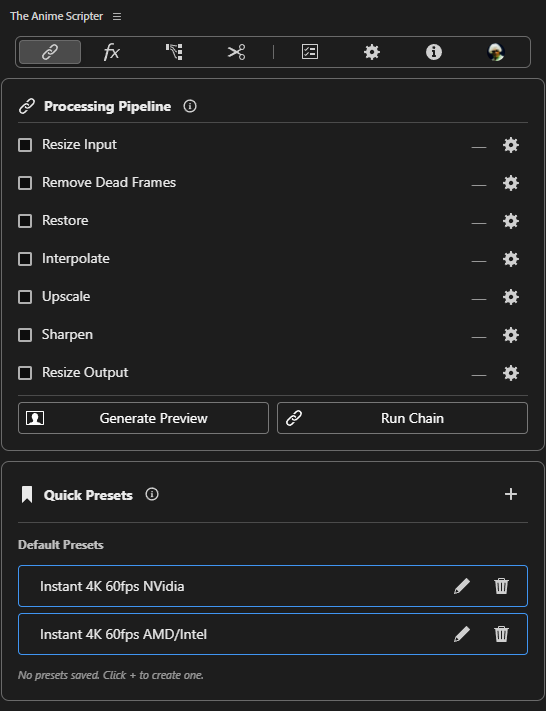
The CUDA, TensorRT and OpenVINO backends are paid in TAS-AdobeEdition (MPS coming).
main.py · Python 3.14 · AGPL-3.0
Every pass is a flag on main.py. Script it, batch it, drop it in a Makefile. It's just a CLI, and it's what the other two run underneath.
$ python main.py --input ep01.mkv \
    --upscale_method span-tensorrt \
    --interpolate_method rife4.25-tensorrt
› stage: interpolate  · rife4.25-tensorrt
› stage: upscale      · span-tensorrt (2×)
› done · ep01-Int2-Up2.mkv
Free and open source. Every model, every backend.
Pipeline
Every pass TAS runs shares a single in-memory frame queue, with no redundant disk writes between stages. The steps you switch on decide which stages light up.
Local file, batch list or YouTube URL.
mp4 · mkv · mov · webm
Drops redundant cels before the GPU ever sees them.
SSIM · MSE · FlowNetS · VMAF
Synthesizes in-between frames from neighboring keyframes.
RIFE 4.6 → 4.25-heavy · GMFSS · Elexor
2× with anime-tuned super-resolution architectures.
ShuffleCugan · SPAN · Adore · OpenProteus · AniScale2
Denoise, deblock, dejpeg, sharpen and darken line art. Chainable.
SCUNet · NAFNet · Anime1080Fixer · FastLineDarken
FFmpeg hand-off with animation-tuned x264/x265 or NVENC.
x264_animation_10bit · x265 · NVENC · AV1 · ProRes
Models
74 models across five families in TAS 2.10, before backend variants. Bring your own with --custom_model: Spandrel formats (.pt, .pth, .ckpt, .safetensors) on CUDA, .onnx on TensorRT, DirectML and OpenVINO.
RIFE · GMFSS · DistillDRBA
SPAN · ShuffleCugan · ArtCNN · Cyte
Denoise · Deblock · Line art
Depth Anything V2 / V3 · Video · Limbo
ISNet · BiRefNet · Alpha matte output
CLI
Every pass is a flag. Chain them. Auto-enable is real: specifying a *_method turns the feature on for you.
$ python main.py --input anime_episode.mkv \
    --upscale_method shufflecugan-tensorrt \
    --interpolate_method rife4.25-tensorrt --ensemble \
    --restore_method anime1080fixer-tensorrt \
    --dedup_method ssim-cuda \
    --sharpen --sharpen_sens 30 \
    --encode_method x264_animation_10bit --bit_depth 10bit
› resolving backends · tensorrt engines cached
› stage: dedup        · ssim-cuda
› stage: interpolate  · rife4.25-tensorrt (ensemble)
› stage: upscale      · shufflecugan-tensorrt (2×)
› stage: restore      · anime1080fixer-tensorrt + sharpen
› encoder · libx264 · animation · 10-bit
Install
Pick the app on Windows, or grab the prebuilt CLI for Windows x64 and Apple Silicon macOS. Neither needs Python installed. Linux runs from source.
> irm tas.nevermindnilas.dev/install.ps1 | iexFAQ
TAS Standalone if you're on Windows and want to point, click and render. TAS-AdobeEdition if you live in After Effects and want TAS inside your comp. The CLI if you script, batch on a server, run Linux or want every backend for free. All three drive the same engine, so a model or flag behaves the same everywhere.
If you have an RTX 20/30/40/50 card, use the CUDA + TensorRT build for the best speed. GTX 16 series works on CUDA. Recent AMD cards can run the ROCm backend, and older AMD cards plus GTX 10 series (Pascal) run on DirectML. Intel iGPUs and dGPUs run on OpenVINO. Apple Silicon runs on MPS. Pick the matching -tensorrt, -rocm, -directml, -openvino or -mps model suffix. TAS Standalone detects your hardware and installs the right runtime for you.
The installer isn't code-signed yet, so SmartScreen shows "Windows protected your PC" for every new release. Choose More info, then Run anyway. Only download it from the official GitHub releases, which is where every link on this page points. It installs per user, so it never asks for admin rights.
macOS: yes, on Apple Silicon, through the CLI and TAS-AdobeEdition. Every release ships a prebuilt macOS-arm64 zip alongside the Windows one, and MPS accelerates interpolation, upscaling, restoration, depth and motion blur. Be aware of the gaps: segmentation, dedup, scene detection and stabilization have no MPS path and fall back to CPU, there is no TensorRT / DirectML / OpenVINO, there is no hardware video encoder, and Intel Macs are not supported. You also need Homebrew, because TAS installs FFmpeg through it on first run rather than bundling it.
Linux: runs from source with the CUDA or lite dependency profile, but there is no prebuilt binary yet. TAS Standalone is Windows only for now.
Yes. The --custom_model flag accepts .pt, .pth, .ckpt and .safetensors for the CUDA compact path via Spandrel, and .onnx for the -directml, -openvino and -tensorrt variants. Just match the backend suffix to the file format. TAS Standalone exposes the same option as a file picker on the Upscale step.
No. TAS Standalone downloads and sets up the engine on first launch, and the prebuilt Windows and macOS CLI releases bundle everything they need. On first run TAS will fetch FFmpeg automatically if it isn't already present. You only need Python if you're cloning the repo to develop, in which case pip install -r requirements.txt plus one of the extra-requirements-* profiles will get you going.
The CLI is. The source is on GitHub under the AGPL-3.0 license. Fork it, modify it, redistribute it, just keep any network-service derivatives open under the same license.
The two apps are free to download and closed source. TAS Standalone is free with DirectML and CPU, and its OpenVINO, CUDA, TensorRT and ROCm backends need a $3+ sponsorship. In TAS-AdobeEdition the CUDA, TensorRT and OpenVINO backends are paid (MPS coming).
The CLI is unpaid work. The apps' GPU backends, GitHub Sponsors and Patreon cover model training and hardware. Link your sponsor account inside TAS Standalone to unlock its GPU backends. Sponsors also get a role on the Discord: run /verify_sponsor and follow the link it gives you.
Yes. New models, backends and restoration passes land regularly, and TAS Standalone and TAS-AdobeEdition (After Effects, with Premiere Pro support in alpha) are both under active development. Follow releases on GitHub or join the Discord for nightly builds.
Desktop app, After Effects panel or free CLI. Every model, one engine.
TAS is mostly unpaid work. If it saves you render hours, support it on
GitHub Sponsors or
Patreon.
Either one unlocks the GPU backends in TAS Standalone and the sponsor role on Discord via /verify_sponsor.